Your invoice, in the format your counter needs.
Choose a suitable print format and customise supported bill details. A clear invoice should fit the paper, display the business identity and give the customer useful transaction information.
Saved transaction
Selected company and layout
Customer-readable document
See the screens behind the workflow.
Real screens from the Speed Plus 9 manual. Open any image to inspect the details.
 View full size ↗
One print window, several ways to send the document.
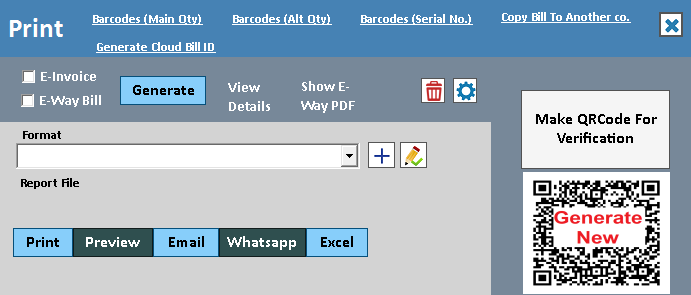
The actual Print window has format selection, preview, print, email and WhatsApp actions. Choose the appropriate format and inspect the output before sharing. The screenshot shows the output controls, not a finished invoice design.
A useful invoice is readable as well as complete.
Bill formats control how recorded transaction information is presented. A garment counter may need a compact size breakdown; a wholesale invoice may need more party and item details. The format should help the customer verify the transaction without changing the underlying entry.
Choose the paper size and suitable layout, then review company details, item columns, totals and terms in print preview. Company-specific formats help keep different business identities separate. Test long item names and multi-page bills, not only a short sample.
How to use it.
Your invoice, in the format your counter needs.
- 01
Choose the paper and bill format
- 02
Configure the logo, required fields and terms
- 03
Preview a representative bill and test the printer
What this looks like in your business.
A shop uses a compact thermal receipt at the counter and a detailed A4 invoice for business customers.
See the workflow in action.
Speed Plus 9.0: Now Apply Different Invoice Formats for Different Companies www.solversolutions.in
SolverTeam tutorial for this topic. Screens and options can vary by installed version.
Open on YouTube ↗Good questions.
Clear answers.
Choose the workflow that fits your business and confirm its setup in a demonstration.
Can one format suit both thermal and A4 printing?
The available space differs substantially. Select or configure an appropriate layout for each device and test the fields your customers need, especially tax details, item descriptions and totals.
What setup should I confirm?
Paper size and printer settings affect the result. Test long item names and multi-page invoices before use.
Run a busy billing counter
From the item on the shelf to the receipt in the customer’s hand.
- 01Item master and searchRead guide →
- 02Barcode checkoutRead guide →
- 03Regular POSRead guide →
- 04Split paymentsRead guide →
- 05Custom bill formatsYou are here
What else can help?
See it with a sample from your business.
Bring a sample bill or item list. We’ll show you the steps and answer your questions.