Bring the served order to a clear final bill.
Review restaurant order lines before closing the bill and recording payment. Keep the table/order reference connected to the final customer document.
Reviewed served order
Bill and payment allocation
Settlement and collection records
See the screens behind the workflow.
Real screens from the Speed Plus 9 manual. Open any image to inspect the details.
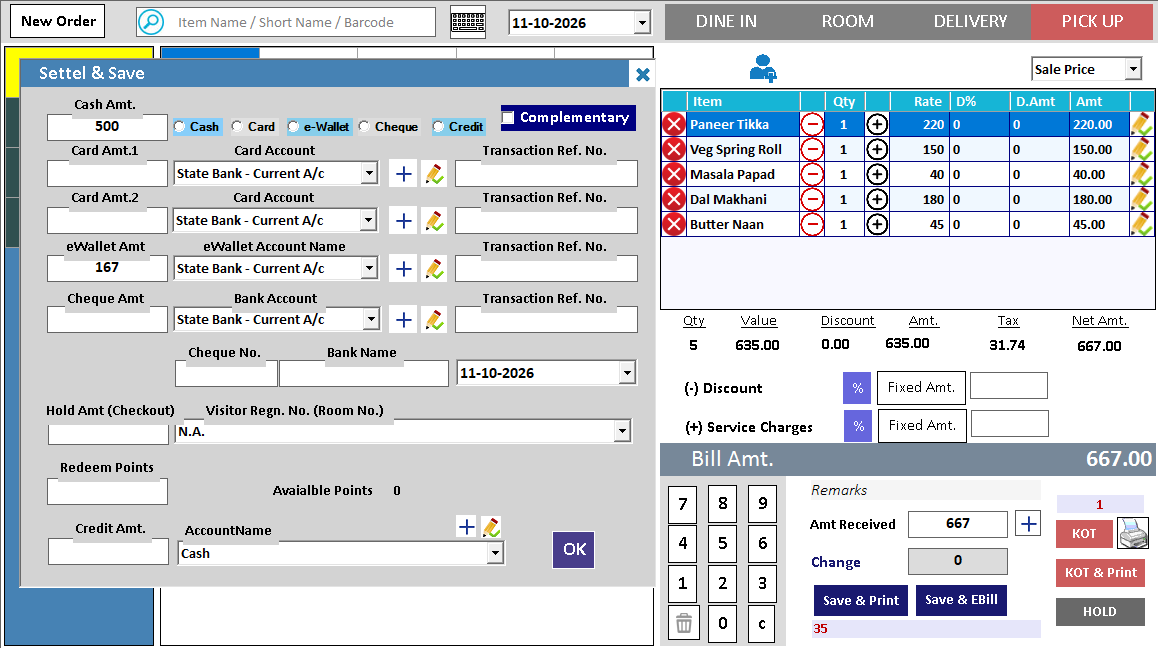 View full size ↗
02Review the bill and payment at the table+
 View full size ↗
Desktop settlement and phone collection are different paths.
The desktop Settle & Save example shows cash and eWallet amounts with an account selection. Tablio shows the customer bill and payment choices on the phone, followed by the PC’s received-bill workflow. Check the recorded totals and allocation in the path your restaurant uses; a phone collection is not proof of final accounting posting.
The restaurant bill closes the service story.
Restaurant billing brings the ordered items into a customer-facing total and records how the amount is settled. Before payment, the cashier needs the correct table or order, quantities and authorised adjustments so the final document reflects the service provided.
Review the bill, apply supported discounts with the appropriate access and record the actual payment methods. Demonstrate any split-bill requirement separately from split payment. At handover, compare bill references and collections so a digital receipt is not included in the physical cash count.
How to use it.
Bring the served order to a clear final bill.
- 01
Review the table or order's chargeable items
- 02
Apply authorised supported adjustments
- 03
Record the payment and check the final bill
What this looks like in your business.
A group finishes dining and the cashier checks the complete order before accepting a payment.
Good questions.
Clear answers.
Choose the workflow that fits your business and confirm its setup in a demonstration.
What if some guests pay cash and others pay digitally?
Use the supported settlement method and record the actual amounts. If separate customer bills are required, use the supported bill-splitting workflow first; payment allocation alone does not create distinct itemised bills.
What setup should I confirm?
Confirm split-bill, split-payment and discount support for the exact restaurant workflow you need.
Take an order from table to payment
Follow the service journey across the table, kitchen and billing counter.
- 01Restaurant table managementRead guide →
- 02Restaurant menu variantsRead guide →
- 03Restaurant KOTRead guide →
- 04Kitchen displayRead guide →
- 05Restaurant billing and paymentsYou are here
What else can help?
See it with a sample from your business.
Bring a sample bill or item list. We’ll show you the steps and answer your questions.